Cisco Firewall Guide: From ASA to Hybrid Mesh Firewall
The Evolution of Firewalling
Firewalling has evolved through four distinct generations, each responding to fundamental shifts in how networks are used and attacked.
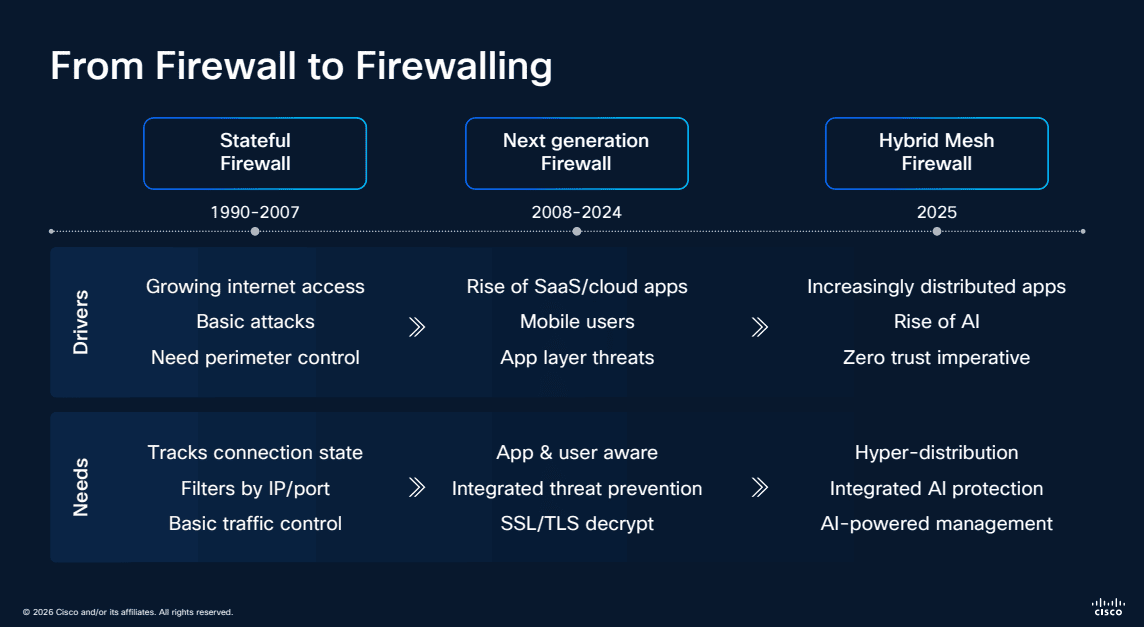
Stateful Firewalls (1990-2007) addressed growing internet access and basic attacks with connection state tracking, IP/port filtering, and basic traffic control. SSL/TLS decryption emerged toward the end of this era.
Next-Generation Firewalls (2008-2024) responded to the rise of SaaS, mobile users, and application-layer threats with integrated threat prevention, application and user visibility, and deep packet inspection.
Hybrid Mesh Firewall (2025+) represents the current generation — designed for increasingly distributed applications, hyper-distribution of users, and zero trust imperatives. It brings AI-powered management, hyper-distributed enforcement, and integrated AI protection across every enforcement point.
What Is Cisco Hybrid Mesh Firewall?
Cisco Hybrid Mesh Firewall is a distributed security architecture designed to protect modern enterprises where applications, users, and data are everywhere. Rather than funneling all traffic through a single firewall choke point, it extends enforcement across the entire network fabric.
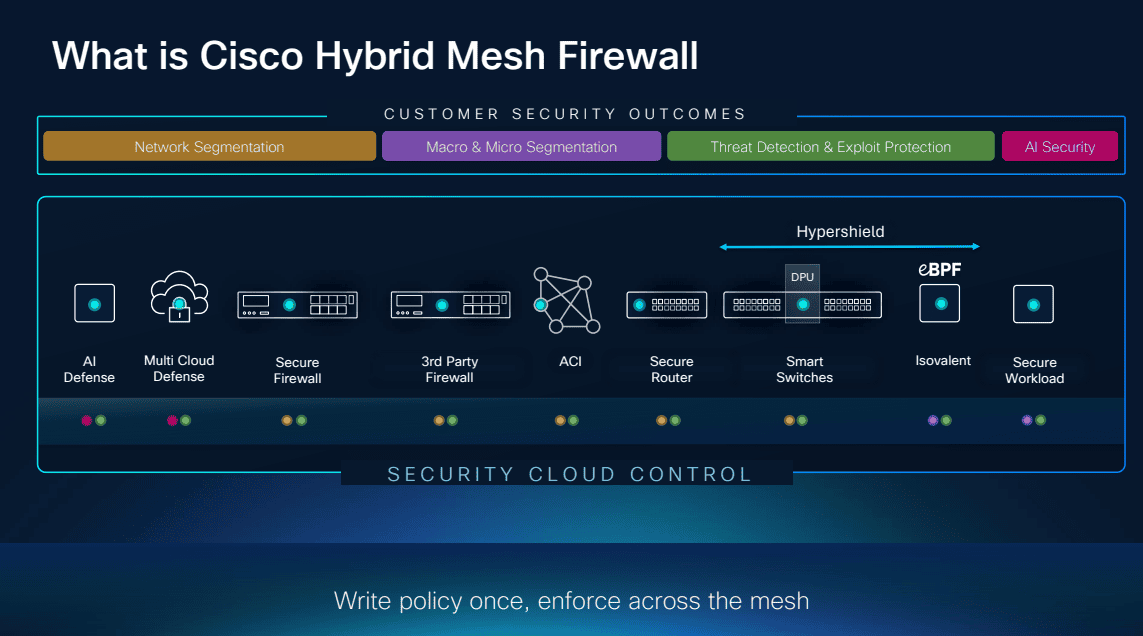
The architecture delivers security outcomes across threat defense, micro-segmentation, application access control, and encrypted traffic visibility — all managed through a unified Security Cloud Control plane.
Architecture: Define Once, Enforce Everywhere
The Hybrid Mesh Firewall architecture consists of four enforcement layers, all managed centrally:
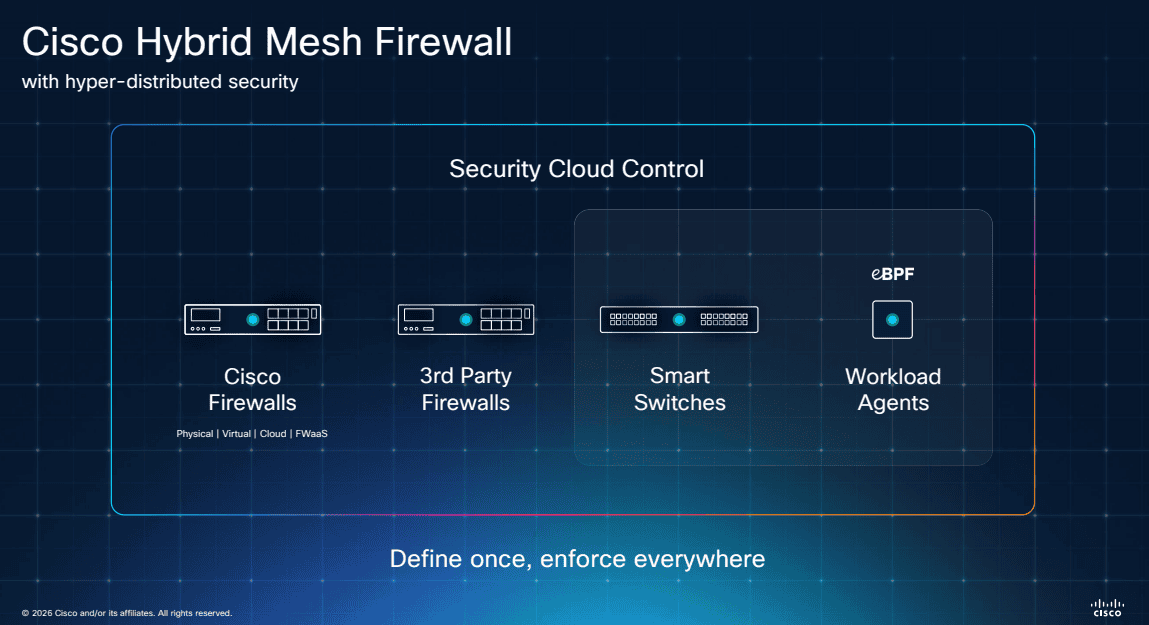
- Cisco Firewalls — Secure Firewall appliances (hardware and virtual)
- Third-Party Firewalls — multi-vendor support through Security Cloud Control
- Smart Switches — network infrastructure as enforcement points
- Workload Agents (eBPF) — lightweight kernel-level enforcement directly on servers and containers
The key principle is define once, enforce everywhere — a single policy definition propagates to all enforcement points regardless of form factor.
Broader and Deeper Coverage
The Hybrid Mesh architecture goes both broader (more enforcement points) and deeper (more granular control) than traditional firewalls:
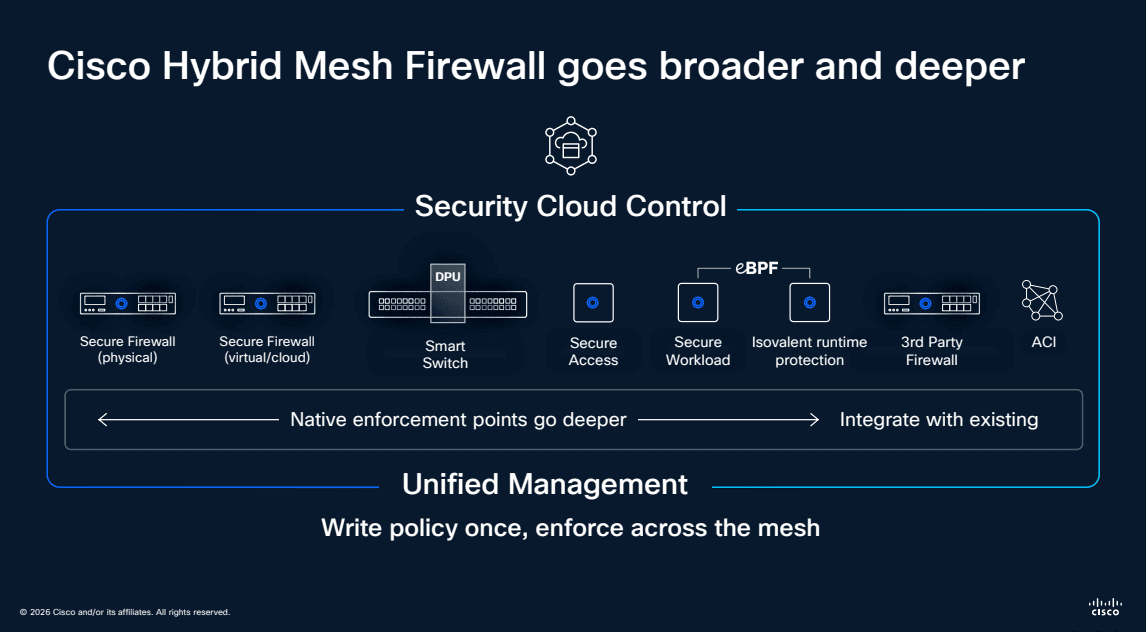
Native enforcement points go deeper with Cisco-native products, while integration with existing third-party infrastructure ensures organizations can adopt the architecture without ripping and replacing their current investments.
Security Cloud Control
Security Cloud Control is the management brain behind the Hybrid Mesh Firewall — and it represents a major shift in how firewall policies are managed.
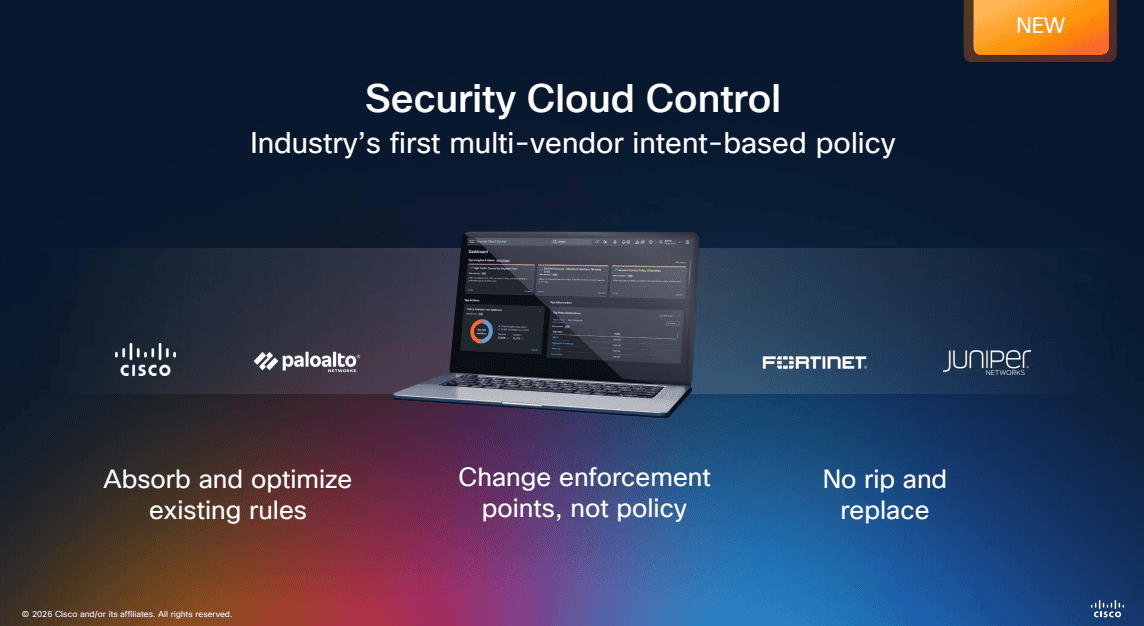
As the industry’s first multi-vendor intent-based policy platform, Security Cloud Control supports:
- Cisco firewalls natively
- Palo Alto Networks firewalls
- Fortinet firewalls
- Juniper firewalls
This means organizations can absorb and optimize existing rules from any supported vendor, change enforcement points without rewriting policy, and avoid the traditional rip-and-replace approach to firewall migration.
Deployment Architecture
The Hybrid Mesh Firewall secures traffic across every network segment — from campus and branch locations through private and public cloud to operational technology environments.
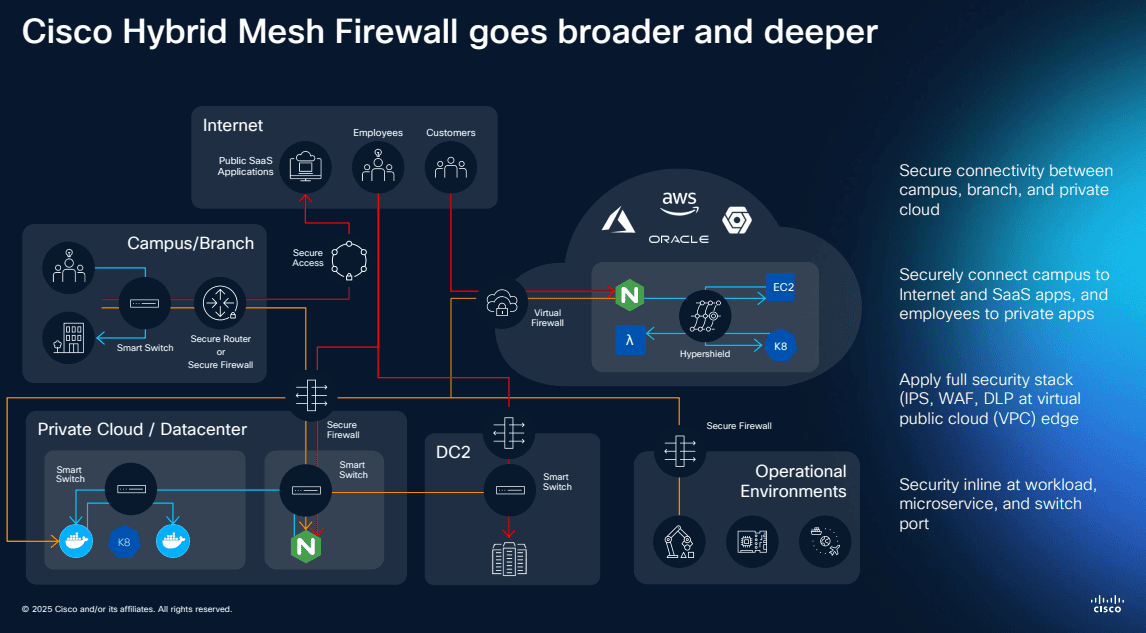
Key deployment scenarios include:
- Campus/Branch — secure connectivity between sites using hardware appliances
- Internet and SaaS — security content control at the internet edge
- Private Cloud/Datacenter — micro-segmentation and east-west traffic protection using FPR, BRKF, FTF, or virtual form factors
- Public Cloud — native deployment on AWS, Azure, GCP, and Oracle Cloud
- Operational Technology — security visible at workload, application, and device levels
Common Deployment Use Cases
Different network locations have unique security requirements. Cisco Secure Firewall addresses each with purpose-built capabilities:
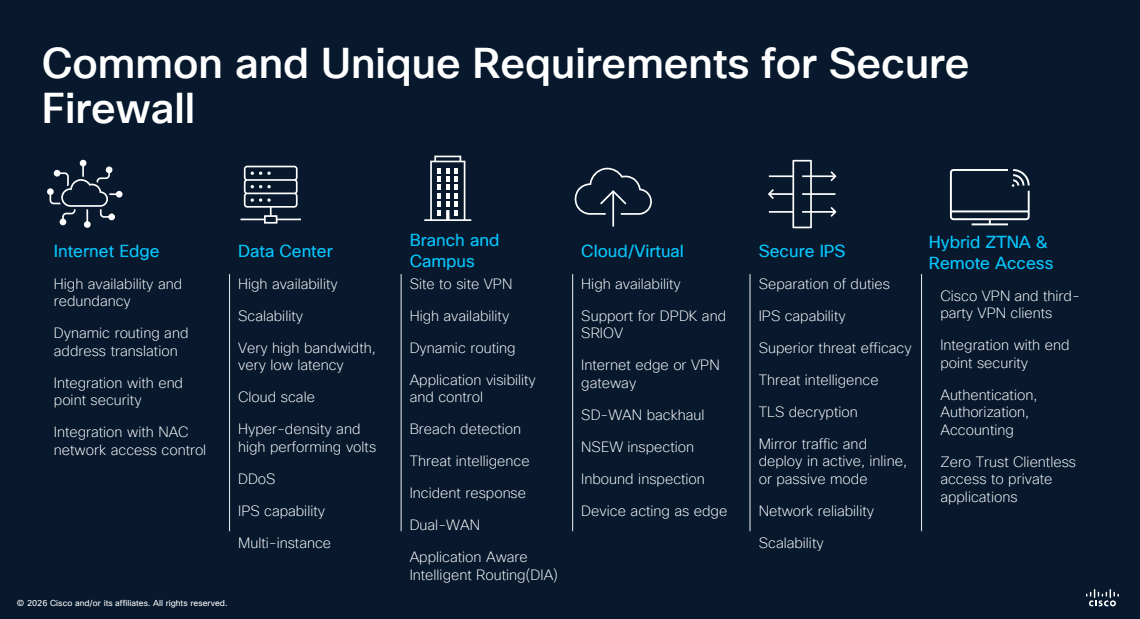
- Internet Edge — high scalability, redundancy, URL filtering, advanced malware protection, application visibility, and remote access control
- Data Center — high availability, clustering, very high throughput, dynamic routing, cloud-scale VPN, and IPS capabilities
- Branch and Remote — site-to-site VPN, dynamic routing, SD-WAN integration, local threat prevention, and cloud-managed options
- Cloud/Virtual — high scalability, IPSec support, dynamic range of VPN deployments, auto-scale integration, and cloud-native management
- Secure IPS — deep packet inspection, Snort 3.0 capabilities, and Talos threat intelligence
- Hybrid ZTNA and Remote Access — cloud VPN and proxy, SAML integration, superior threat efficacy, MFA with Duo, and multi-site VPN
Firewalls for Every Use Case
Cisco offers hardware platforms across every deployment size — from small branch offices to large data centers — plus virtual and cloud options.
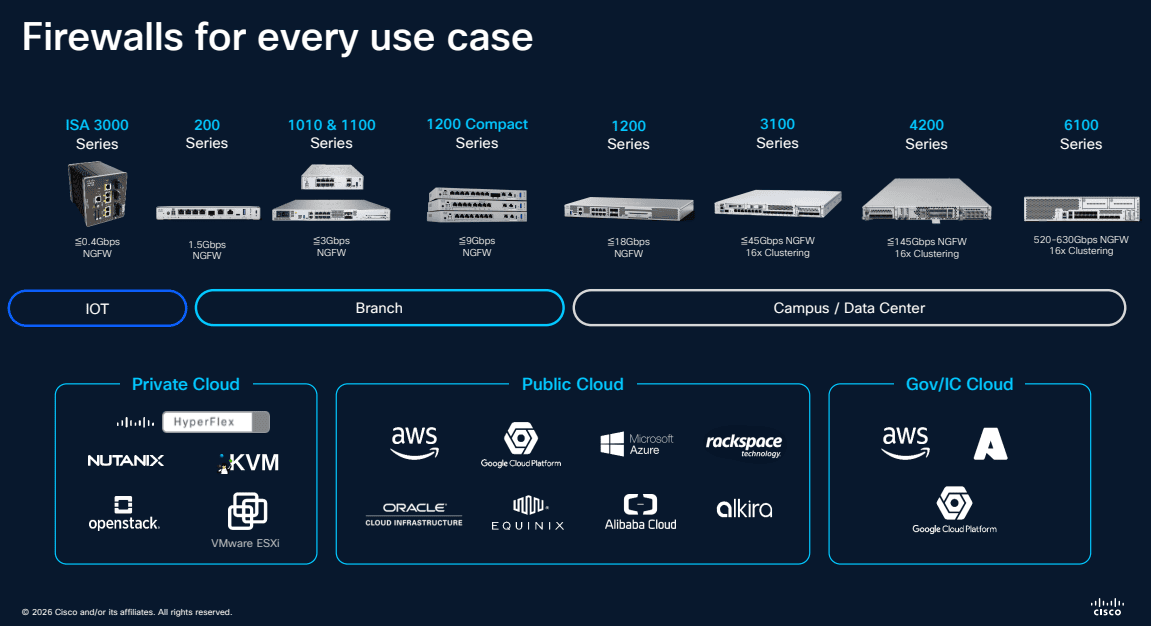
Hardware platforms include:
- ISA 3000 — industrial/OT environments
- 1200 Series and 1100 Series — branch and small office
- 3100 Series — campus and medium enterprise
- 4200 Series — data center and large enterprise
- 9300 Chassis — carrier-grade and service provider
Virtual and cloud options:
- Private Cloud — Nutanix, KVM, VMware
- Public Cloud — AWS, Azure, GCP, Oracle Cloud, Alibaba Cloud
- Gov/Sec Cloud — AWS GovCloud, Azure Government
Supported Platforms and Management
Understanding which management platform supports which hardware is critical for planning your deployment:
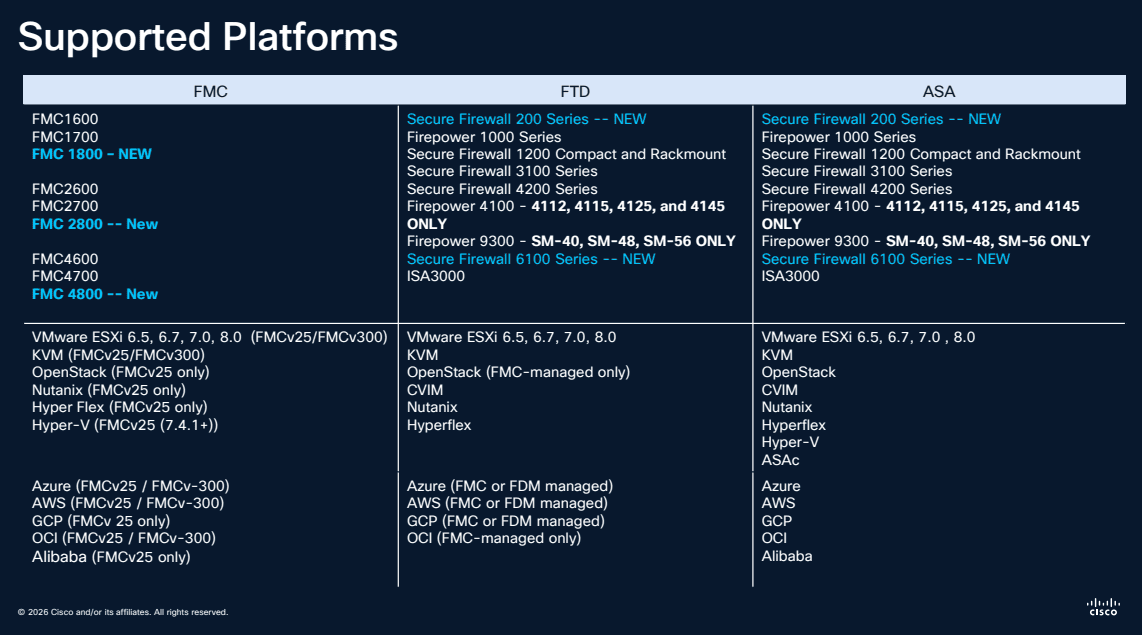
Key management options:
- Firepower Management Center (FMC) — full-featured on-premises or cloud-delivered management
- Firepower Device Manager (FDM) — simplified on-box management for smaller deployments
- Security Cloud Control (CDO) — cloud-native multi-vendor management
Upgrade Paths
Planning your upgrade path is essential when moving to newer FTD versions:
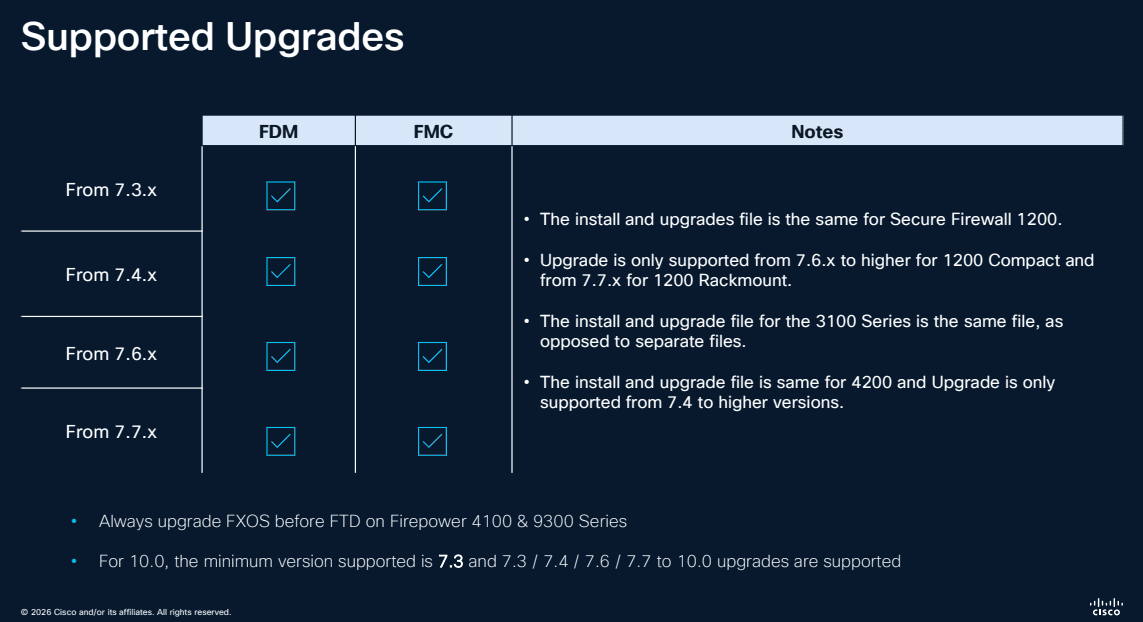
Key considerations:
- Upgrade paths vary by hardware model — always check compatibility before upgrading
- The minimum supported version is FTD 7.0, with 7.3/7.4/7.6/7.7 as common upgrade targets
- FXOS to FTD upgrades on Firepower 4100 and 9300 series require specific version combinations
- Always upgrade FXOS before FTD on applicable platforms
Multi-Instance Deployment
For large enterprises needing to consolidate multiple security zones onto fewer physical appliances, FTD supports multi-instance mode:
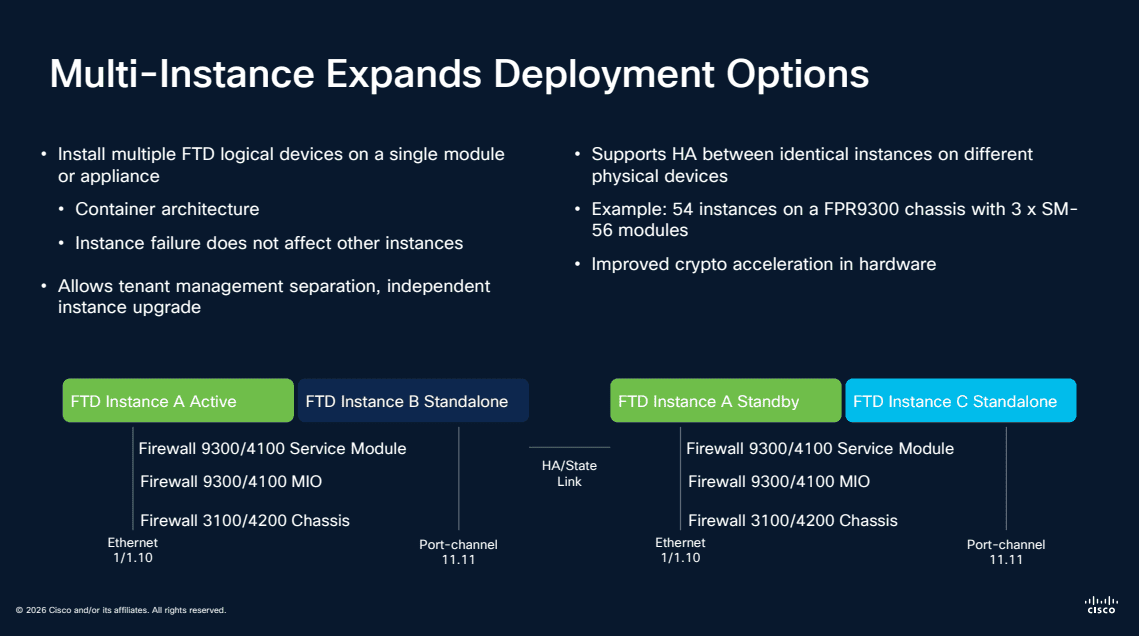
- Install multiple FTD logical devices on a single module or appliance using container architecture
- Each instance operates independently — a failure in one does not affect others
- Allows tenant management separation with independent instance upgrades
- Supported platforms: Firepower 3100/4100 MIO, Firepower 3100/4200 Chassis, and FPR9300 (up to 54 instances with 3x SM-56 modules)
- Full HA support with identical instances on different physical devices including encrypted crypto acceleration in hardware
Key FTD Capabilities
Snort 3.0 IPS
Snort 3.0 brings a multi-threaded architecture that dramatically improves throughput while enabling more sophisticated inspection rules:
- Multi-threaded processing for higher performance
- More flexible rule language
- Better handling of modern protocols
- Improved HTTP/2 and TLS 1.3 inspection
Encrypted Visibility Engine
One of FTD’s most innovative features — the ability to identify threats in encrypted traffic without decrypting it. Using machine learning, the Encrypted Visibility Engine analyzes TLS handshake metadata, packet sizes, and timing patterns to detect malware and command-and-control traffic.
Active Directory Integration
FTD integrates with Active Directory to enforce identity-based firewall policies. Instead of writing rules based on IP addresses, you can create policies like “allow the Engineering team to access the development servers” — policies that follow users regardless of their IP.
Migration: ASA to FTD
Why Migrate?
- Access to Snort 3.0 IPS and advanced threat detection
- Encrypted Visibility Engine (not available on ASA)
- Cloud-delivered management options
- Hybrid Mesh Firewall architecture support
- Continued feature investment from Cisco
Migration Tools
Cisco provides the Firepower Migration Tool that automates the conversion of ASA configurations to FTD policies. The tool handles:
- Access control rules
- NAT policies
- VPN configurations
- Object and object group migration
Migration Best Practices
- Inventory your ASA rules — identify unused or redundant rules before migrating
- Run the migration tool — convert your config and review the results
- Test in monitor mode — deploy FTD in IDS mode alongside your ASA to compare behavior
- Cut over gradually — migrate traffic in phases rather than all at once
- Optimize post-migration — take advantage of FTD features not available on ASA
Frequently Asked Questions
What is Cisco Firepower Threat Defense (FTD)? Cisco Firepower Threat Defense (FTD) is Cisco’s next-generation firewall platform that combines traditional ASA firewall capabilities with advanced threat detection features including Snort 3.0 IPS, encrypted visibility engine, and identity-based access policies in a single unified image.
What is Cisco Hybrid Mesh Firewall? Cisco Hybrid Mesh Firewall is a distributed security architecture that extends firewall enforcement across data centers, campuses, branches, cloud environments, and remote workers through a unified Security Cloud Control management plane. It includes Cisco firewalls, third-party firewalls, smart switches, and workload agents.
What is Security Cloud Control? Security Cloud Control is Cisco’s multi-vendor intent-based policy management platform. It absorbs and optimizes existing firewall rules from Cisco, Palo Alto, Fortinet, and Juniper, allowing organizations to change enforcement points without rewriting policies.
How do I migrate from Cisco ASA to FTD? Use the Cisco Firepower Migration Tool to automate the conversion of ASA configurations to FTD policies. The tool handles access control rules, NAT policies, VPN configurations, and object migration. Best practice is to test FTD in monitor mode alongside ASA before cutting over gradually.
What are the FTD deployment options? FTD can be deployed on hardware appliances (Firepower 1000, 2100, 3100, 4200, 9300 series), as virtual instances (FTDv on VMware, KVM, AWS, Azure, GCP, OCI), or as a cloud-delivered service. Multi-instance mode allows running multiple FTD logical devices on a single appliance.
Related Guides
Looking to deepen your security knowledge? Explore our other comprehensive guides:
- Zero Trust Security: The Complete Guide — Learn how Zero Trust principles like micro-segmentation and least privilege access complement your firewall strategy for defense in depth.
- XDR Explained: Extended Detection and Response Guide — Discover how Cisco XDR uses Secure Firewall as a key telemetry source for cross-domain threat detection and automated response.
Related Episodes
Episodes & Posts on This Topic
Cisco ISE Configuration Guide: 802.1X, Profiling, and Secure Access
Step-by-step Cisco ISE setup guide covering 802.1X for wired, wireless, and VPN. Includes switch configs, Windows supplicant setup, FTD/FMC RADIUS, and …
Zero Trust Architecture: Real-World Examples & Implementation
Practical Zero Trust architecture examples and implementation strategies including micro-segmentation, identity verification, and Google BeyondCorp.


Network Segmentation Strategy: Micro vs VLAN Approaches
VLAN vs micro-segmentation: compare network segmentation strategies including Security Group Tags, group-based policy, and zero trust enforcement.
Zero Trust Architecture: Cisco Secure Access Simplification
How Cisco Secure Access simplifies zero trust architecture with unified policy management, hybrid cloud connectivity, and SSL/TLS decryption at scale.
Zero Trust Security: Beyond Products to Concepts
Why zero trust security is a philosophy, not a product. Learn the foundational concepts, MFA requirements, and practical implementation strategies.
Zero Trust Network Access: Cisco Secure Access Explained
How Cisco Secure Access implements zero trust network access with SSE, ZTNA, secure web gateway, and CASB for modern hybrid workforces.
Zero Trust Identity Management with Cisco ISE
Learn how Cisco ISE enforces zero trust identity management through centralized access control, device profiling, MFA integration, and micro-segmentation.
Multicloud Defense: Unified Visibility Across Cloud Environments
Discover how Cisco Multicloud Defense delivers unified security visibility across AWS, Azure, and GCP with AI-driven threat detection and response.
Firewall Evolution: Cisco's PIX to FTD Journey Explained
Explore Cisco's firewall evolution from PIX to ASA to FTD, including Encrypted Visibility Engine, identity-based policies, and modern deployment strategies.
Firepower Firewall Updates: Snort 3.0 and Network Security
What is new in Cisco Firepower: Snort 3.0 multi-threaded IPS, cloud FMC management, encrypted analytics, SD-WAN integration, and ASA migration strategies.
Endpoint Detection and Response: Zero Trust Security With Cisco
How Cisco Secure Endpoint combines EDR, endpoint protection, vulnerability management, and DLP to deliver zero trust security for modern enterprises.